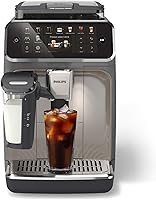
How to Descale a Philips Espresso Machine
To descale a Philips espresso machine, use the descaling program and solution specified in your machine's manual, then rinse as directed. The display and exact steps vary by model.
On this page (8 sections)
- How do you descale a Philips espresso machine?
- What descaler should you use?
- How do you descale a Philips 3200?
- How do you rinse the machine after descaling?
- Can an AquaClean filter reduce descaling?
- Why does the Philips descaling message stay on?
- How often should you descale a Philips coffee machine?
- What is the safest way to descale a Philips espresso machine?
To descale a Philips espresso machine, run the descaling program with a solution approved for your model, then complete every rinse prompt. Button sequences differ, so use the manual for your machine, including a Philips 3200.
Before starting, check the display and remove any drink accessories the manual tells you to take off. Have a large container ready for wastewater, and allow time to finish the full cycle without interruption.
How do you descale a Philips espresso machine?
Follow the descaling steps for your exact model, using its guided program if available. A Philips 3300 includes guided descaling, but the exact prompts and button sequence depend on the machine.
A typical process is:
- Read the machine's descaling instructions and gather the approved solution.
- Empty the drip tray and coffee grounds container if the manual says to.
- Prepare the water tank and solution as directed.
- Put a large container under the coffee and hot water outlets, as instructed.
- Start the descaling program and follow each display prompt.
- Empty the container when prompted, then complete the rinse stage.
- Return the machine to normal use only after the program finishes.
These are general preparation steps, not a substitute for model-specific directions. Don't guess at button combinations or solution amounts.
For a Philips machine with a guided cycle, let the prompts control the sequence. If your display doesn't match the directions you found, pause and check the manual instead of trying a sequence for a different model.
What descaler should you use?
Use a descaling solution Philips approves for your machine. Philips CA6700 is a liquid descaler described as suitable for Philips and Saeco fully automatic machines, and it comes as two 250 ml bottles.
Check the manual for the amount and tank preparation instructions. A bottle's size does not tell you how much to use for one cycle.
Don't mix descaler with other cleaners, and don't substitute a household acid unless Philips explicitly permits it for your model. If you need model-specific instructions, Philips' support page can help you locate the right manual.
How do you descale a Philips 3200?
Use the descaling directions for your specific Philips 3200 model and follow its on-screen prompts. The instructions for one Philips series may not match another, even when the machines share a brand.
Prepare the solution and container as the manual directs, then start the machine's descaling process. Stay nearby so you can empty the container or refill the tank when prompted.
If the machine uses an AquaClean filter, check its status and the manual's directions before descaling. Don't remove or replace a filter unless the instructions call for it.
For drink and button basics before or after maintenance, see how to use a Philips espresso machine. It can help you identify the controls without mixing drink setup with the maintenance cycle.
How do you rinse the machine after descaling?
Finish the full rinse cycle shown by the machine. Rinsing clears the water circuit after the descaling solution has circulated through it.
Follow the display and manual for water-tank refills and container placement. Empty wastewater when prompted, and do not stop the cycle early because the machine pauses.
After the rinse, empty and clean the tank and container if the manual instructs you to. If a descaling warning remains, check that the cycle reached its completion prompt before restarting anything.
Can an AquaClean filter reduce descaling?
An AquaClean filter can extend the time between descaling prompts on some Philips models. Philips says changing the filter when prompted can mean no descaling for up to 5,000 cups on the 3300 and 2200.
That figure depends on following the machine's filter prompts and does not replace its display or manual. When the machine asks you to descale, use the recommended procedure rather than assuming the filter removes the need.
The Philips 3300 LatteGo has an AquaClean filter and guided descaling. Its drink presets include espresso, coffee, iced coffee, cappuccino, latte macchiato, and hot water.
The Philips 2200 LatteGo also has an AquaClean filter, and Philips says prompted filter changes can defer descaling for up to 5,000 cups. It offers espresso, coffee, and cappuccino.
For a broader model comparison, read best Philips espresso machines. To learn how to plan maintenance across machine types, see how often you should descale an espresso machine.
Why does the Philips descaling message stay on?
A message may remain if the machine has not completed every descaling and rinse stage. Check the display for the next prompt and compare it with the manual before repeating the cycle.
Make sure the tank had the required water during the rinse and that wastewater was emptied when requested. If the prompt returns after a completed cycle, consult Philips support for the model rather than improvising a reset.
How often should you descale a Philips coffee machine?
Use the machine's prompt as the main reminder. Water conditions, filter use, and model instructions affect when descaling is due.
Philips' AquaClean guidance for the 3300 and 2200 says prompted filter changes can defer descaling for up to 5,000 cups. Treat that as model-specific guidance, not a universal schedule for every Philips espresso machine.
For other automatic machines, maintenance prompts and intervals can differ. Our guide to how often to descale an espresso machine explains the factors that change the schedule.
What is the safest way to descale a Philips espresso machine?
For anyone learning how to descale a Philips espresso machine, the safe rule is to use the model's instructions, an approved descaler, and the complete rinse cycle. Prepare a wastewater container before starting and stay available for prompts.
Choose Philips CA6700 if you need a Philips-compatible liquid descaler and your manual approves it. If you are comparing machines, the 3300 includes guided descaling, while the 2200 also includes AquaClean filtration.
When in doubt, find the manual for the exact model on Philips support. Keep it nearby for the solution amount, display prompts, and rinse directions.
Frequently asked questions
How do you descale a Philips 3200 espresso machine?
Use the machine's descaling program and follow the prompts in its manual. The exact button sequence can vary by model and display, so check the instructions for your Philips 3200 before starting.
Use the recommended descaler, prepare a container for the wastewater, and complete the rinse cycle.
Can I use vinegar to descale my Philips espresso machine?
Check your Philips manual before choosing a descaling solution, and use a solution Philips approves for your model. The Philips CA6700 liquid descaler is described as suitable for Philips and Saeco fully automatic machines.
Avoid substituting vinegar unless your model's instructions explicitly allow it.
How often should I descale a Philips coffee machine?
Follow the machine's display and manual, since the timing depends on model and use. Philips says AquaClean filter use can defer descaling for up to 5,000 cups on the 3300 and 2200 models when you change the filter after the machine prompts you.
See our guide to how often to descale an espresso machine for more context.
What should I do after descaling a Philips espresso machine?
Complete the rinse steps shown by the machine and in its manual, then empty and rinse the water tank and wastewater container as instructed. If a descaling message remains, check that every prompted stage finished and consult Philips support for your exact model.